
Calibration Dashboard: See Your Entire Program at a Glance
Calibration Dashboard: See Your Entire Program at a Glance
David Bentley
Quality Assurance Engineer
8 min read
Calibration Dashboard: See Your Entire Program at a Glance
Managing hundreds or thousands of measuring instruments across multiple locations is like conducting an orchestra—every piece must be perfectly synchronized. A comprehensive calibration dashboard software transforms this complex coordination into a clear, visual command center where quality managers can instantly assess their entire calibration program's health. Rather than juggling spreadsheets, paper logs, and disparate systems, modern calibration professionals need real-time visibility into overdue calibrations, upcoming schedules, and compliance status across their entire instrument fleet.
The difference between a reactive and proactive calibration program often comes down to visibility. When a Mitutoyo micrometer sitting in Building C is three days overdue, or when 15% of your pressure gauges are approaching their calibration dates within the next two weeks, you need to know immediately—not when an auditor points it out.
The Hidden Chaos Behind Manual Calibration Tracking
Walk into most manufacturing facilities, testing labs, or quality departments, and you'll find calibration management happening in silos. The metrology technician maintains an Excel spreadsheet with calibration due dates. The quality manager has a different tracking system. Production supervisors are unaware that the torque wrench their team relies on expired last month. Meanwhile, the Fluke multimeter in the electrical department hasn't been calibrated in eight months, creating a compliance blind spot that could derail the next ISO audit.
This fragmented approach creates several critical problems:
Reactive fire-fighting: You discover overdue instruments during audits or when problems arise, not beforehand
Compliance gaps: Missing calibration records or expired instruments that slip through the cracks
Inefficient scheduling: Technicians waste time tracking down instruments or making unnecessary trips
Poor resource allocation: No visibility into workload distribution or upcoming capacity needs
Documentation nightmares: Scattered records make audit preparation a stressful, time-consuming process
Consider a pharmaceutical lab managing 500+ instruments across three buildings. Without centralized dashboard visibility, the QA manager discovers during a surprise FDA inspection that 12 analytical balances haven't been calibrated within their required 90-day intervals. The inspector issues an observation that triggers a comprehensive CAPA investigation, delayed product releases, and weeks of remediation work—all because of poor visibility into calibration status.
How Gaugify's Calibration Dashboard Software Creates Program Visibility
Gaugify's calibration dashboard transforms program management from reactive chaos into proactive control. When you log into the system, you're immediately presented with a comprehensive view that answers the most critical questions quality managers face every morning:
Real-Time Status Overview
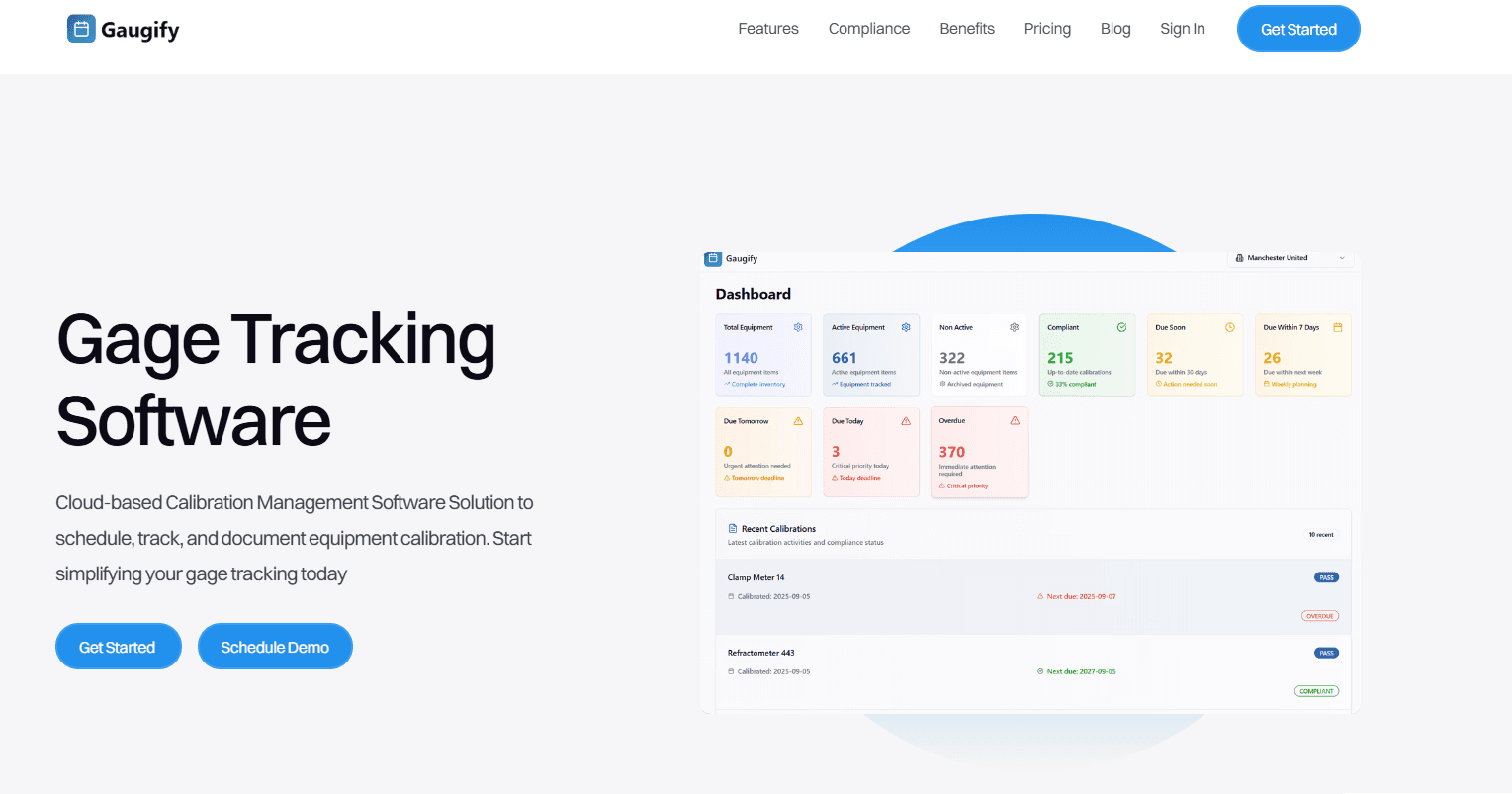
The main dashboard displays key metrics at a glance: total instruments under management, overdue calibrations (highlighted in red), instruments due within the next 30 days (amber warnings), and overall program compliance percentage. For a facility managing 750 instruments, you might see: 734 in compliance (97.9%), 8 overdue, 23 due within two weeks, and 3 pending results.
Color-coded status indicators eliminate guesswork. Red alerts immediately draw attention to overdue items—perhaps that Starrett height gauge in the inspection department that's been overdue for six days. Amber warnings highlight upcoming due dates, like the batch of 15 pressure transducers scheduled for calibration next week.
Interactive Instrument Map
The location-based view shows instrument status across your facility floor plan or multiple sites. Click on "Building A - Machine Shop" and see that 4 of 47 instruments need attention. Drill down further to see that three Fowler dial indicators are due next Tuesday, while one Mitutoyo CMM probe is overdue. This spatial visualization helps technicians plan efficient collection routes and ensures no instruments are forgotten in remote locations.
Workload Planning and Scheduling
The scheduling view provides a calendar-based visualization of upcoming calibration workload. See that Week 23 has 47 instruments due for calibration, while Week 25 only has 12—allowing you to redistribute work or schedule external calibration services accordingly. Filter by instrument type to see that all your torque wrenches are clustered in the same month, enabling batch processing for efficiency.
Advanced filtering capabilities let you slice data multiple ways: view only electrical instruments, sort by criticality level, or focus on specific locations. Search for all Fluke equipment to see calibration patterns across your electrical test instrument fleet.
Ready to transform your calibration program visibility? Start your free trial today and experience the power of centralized calibration dashboard software designed specifically for modern quality professionals.
Measurable Benefits and ROI of Dashboard-Driven Calibration Management
The transition from manual tracking to comprehensive dashboard management delivers quantifiable improvements across multiple operational areas. Organizations typically see immediate benefits within the first month of implementation.
Reduced Compliance Violations
Companies using Gaugify's dashboard report 85-95% reduction in overdue calibrations within the first quarter. One automotive supplier managing 1,200+ gauges reduced their average overdue count from 23 instruments to fewer than 3. The early warning system prevents most violations before they occur, rather than discovering them reactively.
Improved Technician Efficiency
Calibration technicians save 2-4 hours per week previously spent hunting for instruments, checking due dates, and updating multiple tracking systems. The mobile-responsive dashboard allows technicians to update calibration status immediately upon completion, eliminating data entry backlogs and ensuring real-time accuracy.
Route optimization features help technicians collect multiple instruments in the same area during single trips. Instead of making three separate visits to the assembly floor, they can collect the overdue torque wrench, two dial indicators approaching due dates, and a pressure gauge all in one efficient round.
Faster Audit Response
Audit preparation time drops dramatically when calibration records are centralized and instantly accessible. Generate compliance reports with a few clicks rather than spending days assembling documentation from various sources. During audits, respond to specific questions immediately—"Show me all pressure instruments calibrated in Q2" becomes a 30-second query rather than a frantic search through filing cabinets.
Better Resource Planning
Workload forecasting capabilities enable better staffing decisions and budget planning. See that Q4 historically requires 40% more calibration activity due to annual maintenance schedules, allowing you to arrange additional technician coverage or schedule external services in advance.
Supporting Multi-Standard Compliance with Integrated Dashboard Intelligence
Modern calibration programs must satisfy multiple regulatory frameworks simultaneously. A medical device manufacturer needs FDA compliance, ISO 13485 adherence, and potentially ISO 17025 requirements for their calibration lab. Gaugify's compliance features integrate seamlessly with the dashboard to provide regulation-specific visibility.
ISO 9001 Quality Management Integration
The dashboard supports ISO 9001 section 7.1.5 requirements for monitoring and measurement resources. Track not only calibration status but also measurement uncertainty, environmental conditions, and traceability chains. The system maintains complete audit trails showing when calibrations were performed, by whom, and with what reference standards.
ISO 17025 Laboratory Accreditation Support
For organizations operating accredited calibration labs, the dashboard provides specialized views supporting ISO 17025 requirements. Track measurement uncertainties, reference standard genealogy, and environmental monitoring data alongside traditional calibration schedules. Advanced ISO 17025 features include uncertainty budget calculations and statistical analysis of calibration data trends.
FDA and Medical Device Compliance
Medical device manufacturers benefit from FDA 21 CFR Part 820 compliance features integrated into the dashboard view. Critical instruments used in design controls or production testing receive special attention with enhanced tracking, change control documentation, and validation records. The system maintains complete change histories supporting FDA inspection requirements.
Automotive and Aerospace Standards
IATF 16949 and AS9100 requirements for measurement system analysis integrate with dashboard reporting. Track gauge R&R study schedules alongside calibration due dates. Monitor critical measurement characteristics and their associated instrument requirements in a unified view.
Comparison: Modern Dashboard Software vs. Traditional Approaches
Understanding the competitive landscape helps illustrate why comprehensive dashboard functionality represents a significant advancement over traditional calibration management approaches.
Excel-Based Tracking Systems
Most organizations start with Excel spreadsheets—they're familiar, customizable, and "free." However, spreadsheet-based systems quickly become unwieldy as instrument counts grow. Version control becomes impossible when multiple people need access. Filtering and sorting capabilities are limited compared to purpose-built software. Most critically, spreadsheets provide no automated alerts or workflow management.
A typical Excel system might track instrument ID, description, location, last calibration date, and next due date. But it can't automatically calculate workload distribution, generate mobile-friendly collection lists, or provide real-time status updates when technicians complete calibrations in the field.
Legacy Calibration Software
Older calibration management systems often treat dashboard functionality as an afterthought. Database-centric applications provide excellent record-keeping but limited visualization capabilities. Users must run separate reports to understand program status, then manually compile information for management presentations.
These systems typically require significant IT support for installation, backup, and maintenance. User interfaces designed in the 1990s don't adapt to modern mobile workflows or cloud-based accessibility needs.
Enterprise Asset Management Integration
Some organizations attempt to manage calibration within broader Enterprise Asset Management (EAM) systems like SAP or Maximo. While these platforms excel at maintenance scheduling and work order management, they lack calibration-specific functionality like uncertainty calculations, measurement traceability, and compliance reporting.
The dashboard views in EAM systems are designed for mechanical maintenance workflows, not calibration program management. Critical calibration concepts like measurement uncertainty, reference standard traceability, and regulatory compliance get lost in generic asset management frameworks.
Gaugify's Modern Approach
Gaugify was designed from the ground up as cloud-native calibration dashboard software, combining the accessibility of modern web applications with deep calibration domain expertise. The dashboard isn't an add-on feature—it's the central nervous system connecting all calibration management functions.
Real-time synchronization means updates happen instantly across all users and locations. Mobile optimization allows technicians to interact with dashboards on tablets and smartphones without losing functionality. Advanced features like automated workflow management, intelligent scheduling, and compliance monitoring integrate seamlessly with the visual dashboard interface.
Getting Started: Implementing Dashboard-Driven Calibration Management
Transitioning from manual or legacy systems to modern dashboard-driven calibration management requires careful planning but delivers immediate benefits when executed properly.
Data Migration and Setup
Most organizations can migrate existing instrument data within 1-2 weeks. Export your current Excel or database records, then import into Gaugify using built-in mapping tools. The system validates data during import, identifying missing information or inconsistencies that need resolution.
Location mapping connects instruments to physical areas in your facility. Define hierarchical structures like Site > Building > Department > Area to match your organizational structure. This foundation enables the powerful location-based dashboard views that make instrument collection and management so much more efficient.
User Training and Adoption
Dashboard interfaces are inherently intuitive, but maximizing value requires understanding advanced filtering, customization, and reporting capabilities. Plan for 2-3 hours of initial training per user group—quality managers need different dashboard views than calibration technicians or production supervisors.
Start with a pilot group to establish best practices before rolling out organization-wide. Early adopters help identify workflow optimizations and create internal champions who can assist with broader deployment.
Integration with Existing Systems
Modern calibration management doesn't happen in isolation. Integrate dashboard data with quality management systems, ERP platforms, or document management systems using API connections. Export compliance reports directly to audit preparation folders. Send automatic notifications to production managers when critical instruments become overdue.
Transform Your Calibration Program Today
The difference between struggling with calibration compliance and achieving program excellence often comes down to visibility and control. When you can see your entire program at a glance—every overdue instrument, every upcoming deadline, every compliance gap—you transform from reactive fire-fighting to proactive program management.
Gaugify's calibration dashboard software provides the comprehensive visibility that modern quality professionals need to excel in today's regulatory environment. Whether you're managing 50 instruments or 5,000, the dashboard adapts to your needs while maintaining the detailed tracking and compliance features that auditors expect.
Stop letting calibration management happen in the shadows. Take control with real-time dashboard visibility that puts you ahead of problems instead of behind them. Your next audit will thank you, your technicians will work more efficiently, and your management will finally understand the true status of this critical quality system.
Ready to see the difference comprehensive dashboard visibility makes? Start your free trial today or schedule a personalized demo to see how Gaugify transforms calibration program management for organizations just like yours. Experience firsthand how modern calibration dashboard software eliminates the chaos and delivers the control you need to excel.
Calibration Dashboard: See Your Entire Program at a Glance
Managing hundreds or thousands of measuring instruments across multiple locations is like conducting an orchestra—every piece must be perfectly synchronized. A comprehensive calibration dashboard software transforms this complex coordination into a clear, visual command center where quality managers can instantly assess their entire calibration program's health. Rather than juggling spreadsheets, paper logs, and disparate systems, modern calibration professionals need real-time visibility into overdue calibrations, upcoming schedules, and compliance status across their entire instrument fleet.
The difference between a reactive and proactive calibration program often comes down to visibility. When a Mitutoyo micrometer sitting in Building C is three days overdue, or when 15% of your pressure gauges are approaching their calibration dates within the next two weeks, you need to know immediately—not when an auditor points it out.
The Hidden Chaos Behind Manual Calibration Tracking
Walk into most manufacturing facilities, testing labs, or quality departments, and you'll find calibration management happening in silos. The metrology technician maintains an Excel spreadsheet with calibration due dates. The quality manager has a different tracking system. Production supervisors are unaware that the torque wrench their team relies on expired last month. Meanwhile, the Fluke multimeter in the electrical department hasn't been calibrated in eight months, creating a compliance blind spot that could derail the next ISO audit.
This fragmented approach creates several critical problems:
Reactive fire-fighting: You discover overdue instruments during audits or when problems arise, not beforehand
Compliance gaps: Missing calibration records or expired instruments that slip through the cracks
Inefficient scheduling: Technicians waste time tracking down instruments or making unnecessary trips
Poor resource allocation: No visibility into workload distribution or upcoming capacity needs
Documentation nightmares: Scattered records make audit preparation a stressful, time-consuming process
Consider a pharmaceutical lab managing 500+ instruments across three buildings. Without centralized dashboard visibility, the QA manager discovers during a surprise FDA inspection that 12 analytical balances haven't been calibrated within their required 90-day intervals. The inspector issues an observation that triggers a comprehensive CAPA investigation, delayed product releases, and weeks of remediation work—all because of poor visibility into calibration status.
How Gaugify's Calibration Dashboard Software Creates Program Visibility
Gaugify's calibration dashboard transforms program management from reactive chaos into proactive control. When you log into the system, you're immediately presented with a comprehensive view that answers the most critical questions quality managers face every morning:
Real-Time Status Overview
The main dashboard displays key metrics at a glance: total instruments under management, overdue calibrations (highlighted in red), instruments due within the next 30 days (amber warnings), and overall program compliance percentage. For a facility managing 750 instruments, you might see: 734 in compliance (97.9%), 8 overdue, 23 due within two weeks, and 3 pending results.
Color-coded status indicators eliminate guesswork. Red alerts immediately draw attention to overdue items—perhaps that Starrett height gauge in the inspection department that's been overdue for six days. Amber warnings highlight upcoming due dates, like the batch of 15 pressure transducers scheduled for calibration next week.
Interactive Instrument Map
The location-based view shows instrument status across your facility floor plan or multiple sites. Click on "Building A - Machine Shop" and see that 4 of 47 instruments need attention. Drill down further to see that three Fowler dial indicators are due next Tuesday, while one Mitutoyo CMM probe is overdue. This spatial visualization helps technicians plan efficient collection routes and ensures no instruments are forgotten in remote locations.
Workload Planning and Scheduling
The scheduling view provides a calendar-based visualization of upcoming calibration workload. See that Week 23 has 47 instruments due for calibration, while Week 25 only has 12—allowing you to redistribute work or schedule external calibration services accordingly. Filter by instrument type to see that all your torque wrenches are clustered in the same month, enabling batch processing for efficiency.
Advanced filtering capabilities let you slice data multiple ways: view only electrical instruments, sort by criticality level, or focus on specific locations. Search for all Fluke equipment to see calibration patterns across your electrical test instrument fleet.
Ready to transform your calibration program visibility? Start your free trial today and experience the power of centralized calibration dashboard software designed specifically for modern quality professionals.
Measurable Benefits and ROI of Dashboard-Driven Calibration Management
The transition from manual tracking to comprehensive dashboard management delivers quantifiable improvements across multiple operational areas. Organizations typically see immediate benefits within the first month of implementation.
Reduced Compliance Violations
Companies using Gaugify's dashboard report 85-95% reduction in overdue calibrations within the first quarter. One automotive supplier managing 1,200+ gauges reduced their average overdue count from 23 instruments to fewer than 3. The early warning system prevents most violations before they occur, rather than discovering them reactively.
Improved Technician Efficiency
Calibration technicians save 2-4 hours per week previously spent hunting for instruments, checking due dates, and updating multiple tracking systems. The mobile-responsive dashboard allows technicians to update calibration status immediately upon completion, eliminating data entry backlogs and ensuring real-time accuracy.
Route optimization features help technicians collect multiple instruments in the same area during single trips. Instead of making three separate visits to the assembly floor, they can collect the overdue torque wrench, two dial indicators approaching due dates, and a pressure gauge all in one efficient round.
Faster Audit Response
Audit preparation time drops dramatically when calibration records are centralized and instantly accessible. Generate compliance reports with a few clicks rather than spending days assembling documentation from various sources. During audits, respond to specific questions immediately—"Show me all pressure instruments calibrated in Q2" becomes a 30-second query rather than a frantic search through filing cabinets.
Better Resource Planning
Workload forecasting capabilities enable better staffing decisions and budget planning. See that Q4 historically requires 40% more calibration activity due to annual maintenance schedules, allowing you to arrange additional technician coverage or schedule external services in advance.
Supporting Multi-Standard Compliance with Integrated Dashboard Intelligence
Modern calibration programs must satisfy multiple regulatory frameworks simultaneously. A medical device manufacturer needs FDA compliance, ISO 13485 adherence, and potentially ISO 17025 requirements for their calibration lab. Gaugify's compliance features integrate seamlessly with the dashboard to provide regulation-specific visibility.
ISO 9001 Quality Management Integration
The dashboard supports ISO 9001 section 7.1.5 requirements for monitoring and measurement resources. Track not only calibration status but also measurement uncertainty, environmental conditions, and traceability chains. The system maintains complete audit trails showing when calibrations were performed, by whom, and with what reference standards.
ISO 17025 Laboratory Accreditation Support
For organizations operating accredited calibration labs, the dashboard provides specialized views supporting ISO 17025 requirements. Track measurement uncertainties, reference standard genealogy, and environmental monitoring data alongside traditional calibration schedules. Advanced ISO 17025 features include uncertainty budget calculations and statistical analysis of calibration data trends.
FDA and Medical Device Compliance
Medical device manufacturers benefit from FDA 21 CFR Part 820 compliance features integrated into the dashboard view. Critical instruments used in design controls or production testing receive special attention with enhanced tracking, change control documentation, and validation records. The system maintains complete change histories supporting FDA inspection requirements.
Automotive and Aerospace Standards
IATF 16949 and AS9100 requirements for measurement system analysis integrate with dashboard reporting. Track gauge R&R study schedules alongside calibration due dates. Monitor critical measurement characteristics and their associated instrument requirements in a unified view.
Comparison: Modern Dashboard Software vs. Traditional Approaches
Understanding the competitive landscape helps illustrate why comprehensive dashboard functionality represents a significant advancement over traditional calibration management approaches.
Excel-Based Tracking Systems
Most organizations start with Excel spreadsheets—they're familiar, customizable, and "free." However, spreadsheet-based systems quickly become unwieldy as instrument counts grow. Version control becomes impossible when multiple people need access. Filtering and sorting capabilities are limited compared to purpose-built software. Most critically, spreadsheets provide no automated alerts or workflow management.
A typical Excel system might track instrument ID, description, location, last calibration date, and next due date. But it can't automatically calculate workload distribution, generate mobile-friendly collection lists, or provide real-time status updates when technicians complete calibrations in the field.
Legacy Calibration Software
Older calibration management systems often treat dashboard functionality as an afterthought. Database-centric applications provide excellent record-keeping but limited visualization capabilities. Users must run separate reports to understand program status, then manually compile information for management presentations.
These systems typically require significant IT support for installation, backup, and maintenance. User interfaces designed in the 1990s don't adapt to modern mobile workflows or cloud-based accessibility needs.
Enterprise Asset Management Integration
Some organizations attempt to manage calibration within broader Enterprise Asset Management (EAM) systems like SAP or Maximo. While these platforms excel at maintenance scheduling and work order management, they lack calibration-specific functionality like uncertainty calculations, measurement traceability, and compliance reporting.
The dashboard views in EAM systems are designed for mechanical maintenance workflows, not calibration program management. Critical calibration concepts like measurement uncertainty, reference standard traceability, and regulatory compliance get lost in generic asset management frameworks.
Gaugify's Modern Approach
Gaugify was designed from the ground up as cloud-native calibration dashboard software, combining the accessibility of modern web applications with deep calibration domain expertise. The dashboard isn't an add-on feature—it's the central nervous system connecting all calibration management functions.
Real-time synchronization means updates happen instantly across all users and locations. Mobile optimization allows technicians to interact with dashboards on tablets and smartphones without losing functionality. Advanced features like automated workflow management, intelligent scheduling, and compliance monitoring integrate seamlessly with the visual dashboard interface.
Getting Started: Implementing Dashboard-Driven Calibration Management
Transitioning from manual or legacy systems to modern dashboard-driven calibration management requires careful planning but delivers immediate benefits when executed properly.
Data Migration and Setup
Most organizations can migrate existing instrument data within 1-2 weeks. Export your current Excel or database records, then import into Gaugify using built-in mapping tools. The system validates data during import, identifying missing information or inconsistencies that need resolution.
Location mapping connects instruments to physical areas in your facility. Define hierarchical structures like Site > Building > Department > Area to match your organizational structure. This foundation enables the powerful location-based dashboard views that make instrument collection and management so much more efficient.
User Training and Adoption
Dashboard interfaces are inherently intuitive, but maximizing value requires understanding advanced filtering, customization, and reporting capabilities. Plan for 2-3 hours of initial training per user group—quality managers need different dashboard views than calibration technicians or production supervisors.
Start with a pilot group to establish best practices before rolling out organization-wide. Early adopters help identify workflow optimizations and create internal champions who can assist with broader deployment.
Integration with Existing Systems
Modern calibration management doesn't happen in isolation. Integrate dashboard data with quality management systems, ERP platforms, or document management systems using API connections. Export compliance reports directly to audit preparation folders. Send automatic notifications to production managers when critical instruments become overdue.
Transform Your Calibration Program Today
The difference between struggling with calibration compliance and achieving program excellence often comes down to visibility and control. When you can see your entire program at a glance—every overdue instrument, every upcoming deadline, every compliance gap—you transform from reactive fire-fighting to proactive program management.
Gaugify's calibration dashboard software provides the comprehensive visibility that modern quality professionals need to excel in today's regulatory environment. Whether you're managing 50 instruments or 5,000, the dashboard adapts to your needs while maintaining the detailed tracking and compliance features that auditors expect.
Stop letting calibration management happen in the shadows. Take control with real-time dashboard visibility that puts you ahead of problems instead of behind them. Your next audit will thank you, your technicians will work more efficiently, and your management will finally understand the true status of this critical quality system.
Ready to see the difference comprehensive dashboard visibility makes? Start your free trial today or schedule a personalized demo to see how Gaugify transforms calibration program management for organizations just like yours. Experience firsthand how modern calibration dashboard software eliminates the chaos and delivers the control you need to excel.